
Änderung des Workflows - Zeugnis zurück an Vorgesetzten
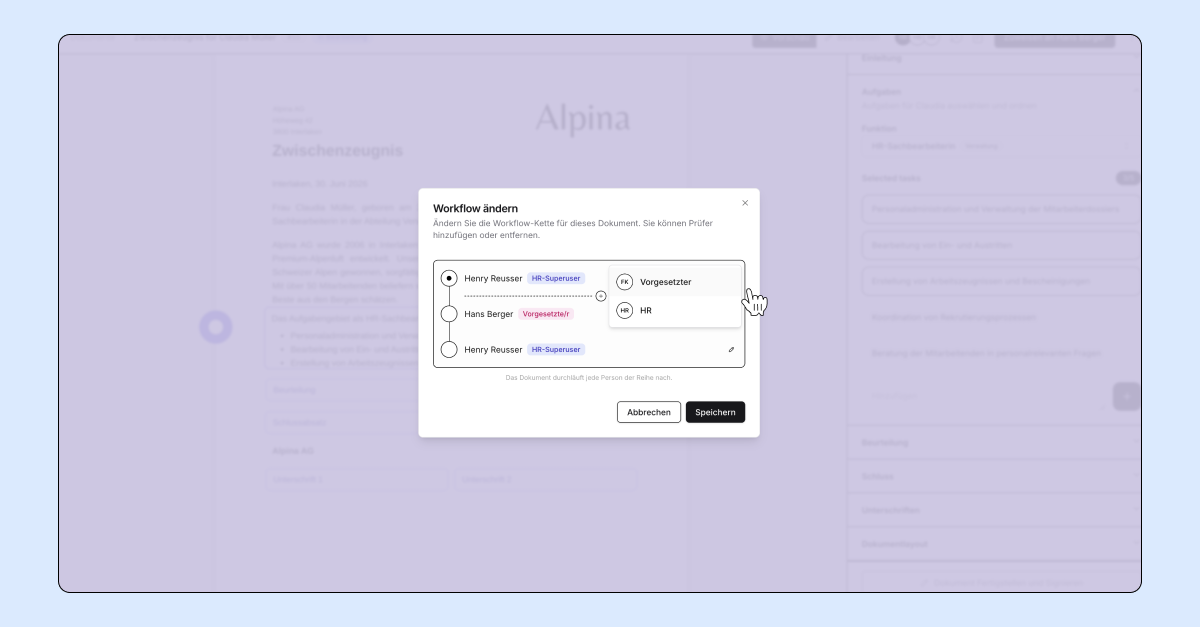
um das Zeugnis innerhalb des Prozesses hin- und herzuschicken, kann man den Workflow anpassen
der Workflow wurde beim Erstellen des Zeugnisses festgelegt, man kann aber jederzeit jemand neues hinzufügen oder das Zeugnis an jemanden bestehenden zurückschicken
Neuen Teilnehmer hinzufügen
klick auf die drei Punkte und wähle
Workflow ändernklick auf das
Plus, an dem Ort, wo die zusätzliche Person im Workflow sein solltewähle
VorgesetzteroderHRsuche und füge die Person hinzu
klick auf
Speichern
Zeugnis an Vorgesetzten zurückschicken
Um das Zeugnis wieder an den Vorgesetzten zurückzuschicken, klicke auf die drei Punkte und
Workflow ändernklicke auf den
Kreisvor dem Namen des Vorgesetzten undspeicherndas Zeugnis ist nun wieder beim Vorgesetzten und der Ablauf folgt dem Workflow